Here is the java code to implement this.
First create a java file named CreateTable.java and copy the contents into it.
| package com.coderzheaven.pack; |
| import android.app.Activity; |
| import android.graphics.Color; |
| import android.graphics.Typeface; |
| import android.os.Bundle; |
| import android.widget.TableLayout; |
| import android.widget.TableRow; |
| import android.widget.TextView; |
| import android.widget.TableRow.LayoutParams; |
| public class CreateTable extends Activity { |
| String companies[] = {"Google","Windows","iPhone","Nokia","Samsung", |
| "Google","Windows","iPhone","Nokia","Samsung", |
| "Google","Windows","iPhone","Nokia","Samsung"}; |
| String os[] = {"Android","Mango","iOS","Symbian","Bada", |
| "Android","Mango","iOS","Symbian","Bada", |
| "Android","Mango","iOS","Symbian","Bada"}; |
| TextView companyTV,valueTV; |
| public void onCreate(Bundle savedInstanceState) { |
| super.onCreate(savedInstanceState); |
| setContentView(R.layout.main); |
| tl = (TableLayout) findViewById(R.id.maintable); |
| /** This function add the headers to the table **/ |
| public void addHeaders(){ |
| /** Create a TableRow dynamically **/ |
| tr.setLayoutParams(new LayoutParams( |
| LayoutParams.FILL_PARENT, |
| LayoutParams.WRAP_CONTENT)); |
| /** Creating a TextView to add to the row **/ |
| TextView companyTV = new TextView(this); |
| companyTV.setText("Companies"); |
| companyTV.setTextColor(Color.GRAY); |
| companyTV.setTypeface(Typeface.DEFAULT, Typeface.BOLD); |
| companyTV.setLayoutParams(new LayoutParams(LayoutParams.FILL_PARENT,LayoutParams.WRAP_CONTENT)); |
| companyTV.setPadding(5, 5, 5, 0); |
| /** Creating another textview **/ |
| TextView valueTV = new TextView(this); |
| valueTV.setText("Operating Systems"); |
| valueTV.setTextColor(Color.GRAY); |
| valueTV.setLayoutParams(new LayoutParams(LayoutParams.FILL_PARENT,LayoutParams.WRAP_CONTENT)); |
| valueTV.setPadding(5, 5, 5, 0); |
| valueTV.setTypeface(Typeface.DEFAULT, Typeface.BOLD); |
| tl.addView(tr, new TableLayout.LayoutParams( |
| LayoutParams.FILL_PARENT, |
| LayoutParams.WRAP_CONTENT)); |
| tr.setLayoutParams(new LayoutParams( |
| LayoutParams.FILL_PARENT, |
| LayoutParams.WRAP_CONTENT)); |
| /** Creating another textview **/ |
| TextView divider = new TextView(this); |
| divider.setText("-----------------"); |
| divider.setTextColor(Color.GREEN); |
| divider.setLayoutParams(new LayoutParams(LayoutParams.FILL_PARENT,LayoutParams.WRAP_CONTENT)); |
| divider.setPadding(5, 0, 0, 0); |
| divider.setTypeface(Typeface.DEFAULT, Typeface.BOLD); |
| TextView divider2 = new TextView(this); |
| divider2.setText("-------------------------"); |
| divider2.setTextColor(Color.GREEN); |
| divider2.setLayoutParams(new LayoutParams(LayoutParams.FILL_PARENT,LayoutParams.WRAP_CONTENT)); |
| divider2.setPadding(5, 0, 0, 0); |
| divider2.setTypeface(Typeface.DEFAULT, Typeface.BOLD); |
| tl.addView(tr, new TableLayout.LayoutParams( |
| LayoutParams.FILL_PARENT, |
| LayoutParams.WRAP_CONTENT)); |
| /** This function add the data to the table **/ |
| for (int i = 0; i < companies.length; i++) |
| /** Create a TableRow dynamically **/ |
| tr.setLayoutParams(new LayoutParams( |
| LayoutParams.FILL_PARENT, |
| LayoutParams.WRAP_CONTENT)); |
| /** Creating a TextView to add to the row **/ |
| companyTV = new TextView(this); |
| companyTV.setText(companies[i]); |
| companyTV.setTextColor(Color.RED); |
| companyTV.setTypeface(Typeface.DEFAULT, Typeface.BOLD); |
| companyTV.setLayoutParams(new LayoutParams(LayoutParams.FILL_PARENT,LayoutParams.WRAP_CONTENT)); |
| companyTV.setPadding(5, 5, 5, 5); |
| /** Creating another textview **/ |
| valueTV = new TextView(this); |
| valueTV.setTextColor(Color.GREEN); |
| valueTV.setLayoutParams(new LayoutParams(LayoutParams.FILL_PARENT,LayoutParams.WRAP_CONTENT)); |
| valueTV.setPadding(5, 5, 5, 5); |
| valueTV.setTypeface(Typeface.DEFAULT, Typeface.BOLD); |
| tl.addView(tr, new TableLayout.LayoutParams( |
| LayoutParams.FILL_PARENT, |
| LayoutParams.WRAP_CONTENT)); |
Here is the main.xml file
=====================================================
1 | <?xml version="1.0" encoding="utf-8"?> |
4 | android:id="@+id/LinearLayout01" |
5 | android:layout_width="wrap_content" |
6 | android:layout_height="wrap_content" |
9 | android:layout_width="wrap_content" |
10 | android:layout_height="wrap_content" |
11 | android:scrollbars="none"> |
13 | android:layout_width="fill_parent" |
14 | android:layout_height="fill_parent" |
15 | android:stretchColumns="0,1" |
16 | android:id="@+id/maintable" > |
=======================================================
Now the Strings.xml file
1 | <?xml version="1.0" encoding="utf-8"?> |
3 | <string name="hello">Hello World, CreateTable!</string> |
4 | <string name="app_name">CreateTableRows Dynamically CoderzHeaven.com</string> |
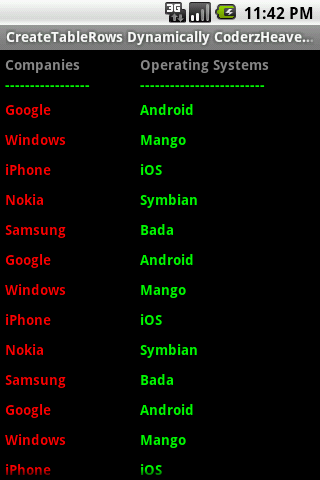
Now the project is complete and you can see the result.

Creating tableRows dynamically in Android

No comments:
Post a Comment